Knytt Classic Cheat Codes
Knytt Classic hides four cheat codes inside its own world, each one drawn on the walls of a secret room as a row of key tiles. Enter the sequence anywhere while playing and the effect toggles on. Pick a safe spot, since you will be pressing movement keys to do it. Enter the same code again to switch it off.
One warning before you touch any of them: the moment you save the game with a cheat active, that save file is permanently marked as cheated. A little devil icon appears on the save slot, and achievements stop unlocking on it. Keep a clean save if you still care about the achievement list.
The four codes
Each code is three lines: two directional sequences followed by a button press. On keyboard, the default Items key is Q and the default Pinpoint key is A.
Low Gravity: jump far higher than usual:
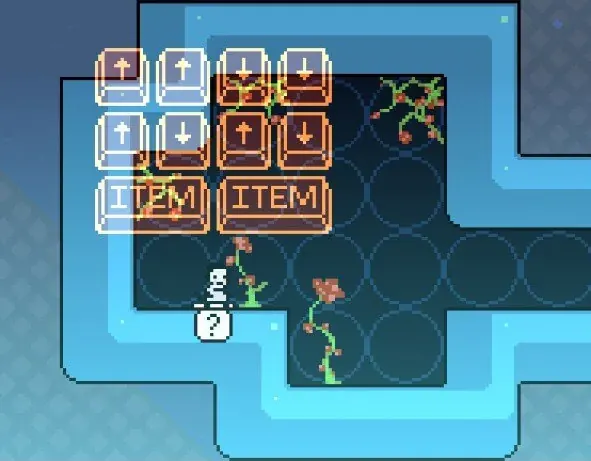
Up Up Down Down
Up Down Up Down
Items Items
Mega Run: a serious burst of movement speed:
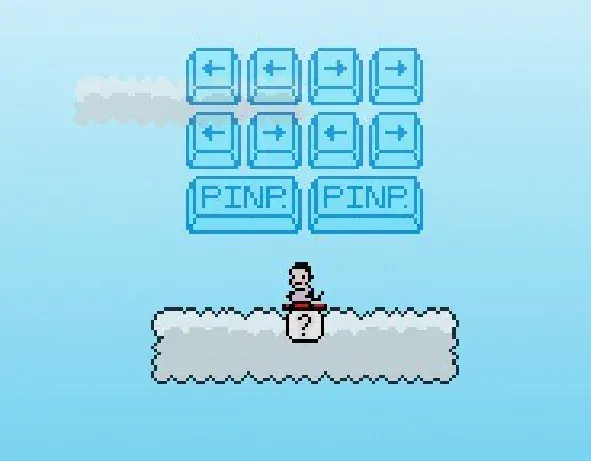
Left Left Right Right
Left Right Left Right
Pinpoint Pinpoint
Hang Glider: drift gently instead of falling:
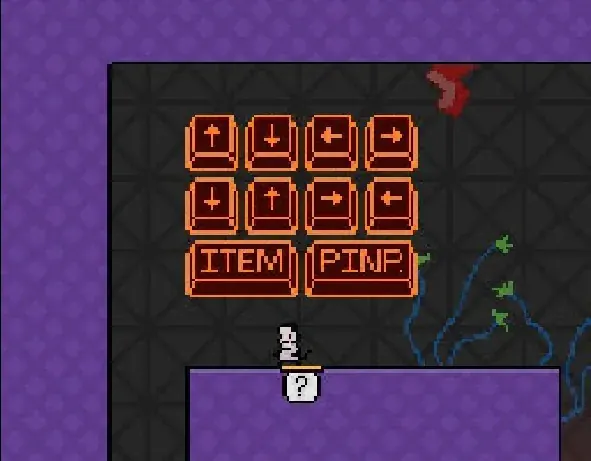
Up Down Left Right
Down Up Right Left
Items PinpointBalloon: float your way over obstacles:
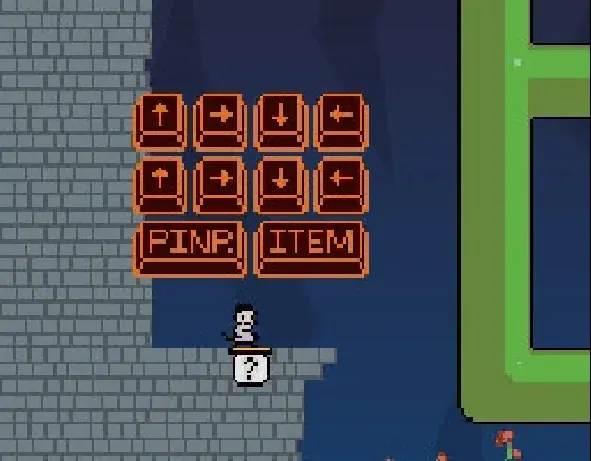
Up Right Down Left
Up Right Down Left
Pinpoint Items
The codes are not listed in a manual anywhere. All four are hidden in the game world itself, drawn as button tiles on the walls of secret areas, so finding them legitimately is its own small treasure hunt. The Hang Glider and Balloon codes were first dug out of UltraTough mode by the community.
The developer console
There is also a second, more direct layer of cheats: press the ~ key to open the developer console. Type help for the full list of commands; the highlight is godmode, which makes you invincible.
The same caveat applies here. Console commands disable some achievements on that save, exactly like the world codes do. Treat the console as a post-completion toy or a way to experiment on a throwaway file rather than something to lean on during a first playthrough.
When to actually use them
All four effects are mobility tools: higher jumps, faster running, gliding and floating. That makes them a natural fit for revisiting the map after you are done, rather than for a first playthrough where they’d cost you your achievements. Keep them on a separate save you’ve already accepted will wear the devil icon, and let the clean file stay clean.